Latest Release
Just click on this link to download the most current release ezuno 5.10.19:
ezuno-5.10.19-Installation-Package
This release of ezuno includes:
- Dark Theme on Windows and Linux
- Single Sign On using Web browser (supports Identity Service)
- Repository modified date for downloaded files/folders
- Support for latest Alfresco
- Support for latest macOS
- Latest Security Updates
Installation
Before installing and setting up ezuno, please verify first that your Alfresco system and your client machines meet all the requirements listed below.
ezuno’s system requirements:
- Alfresco (Enterprise/Community Edition) version greater or equal to 5.2.x running?
- Alfresco Share and Alfresco Repository are installed and accessible via Web browser on all client machines?
- Port TCP 62627 on your Alfresco server is not used and can be accessed from client machines?*
- Operating system on client machines is Windows (Vista or higher), Mac OS X (Mavericks or higher) or Linux?
*Port TCP 62627 is used by ezuno to receive messages from your Alfresco server. If this port is not open, Alfresco Share integration will not work properly!
If you can answer all these questions with „yes“, you’re all set.
If not, please submit a request to find a solution for you!
This article describes how to make your Alfresco server ready for ezuno.
ezuno comes with seamless Alfresco Share integration allowing you to access all essential ezuno functions (e.g. comfortable one-click checkout, one-click edit and quick document preview with the default applications installed on your computer) directly from within Alfresco Share!
This requires two AMP modules to be installed on your Alfresco system included with your ezuno installation package: ezuno-repo-5.x.x-alfresco-x-bundle.amp and ezuno-share-5.x.x.amp
Please Note: These installation steps are usually made by an Alfresco administrator!
How to install ezuno AMP modules:
- Using Alfresco 5.x?
- Copy ezuno-repo-5.x.x-alfresco-5-bundle.amp to [Alfresco_Home]/amps
- Copy ezuno-share-5.x.x-alfresco-5-bundle.amp to [Alfresco_Home]/amps_share
- Using Alfresco 6.x?
- Copy ezuno-repo-5.x.x-alfresco-6-bundle.amp to [Alfresco_Home]/amps
- Copy ezuno-share-5.x.x-alfresco-6-bundle.amp to [Alfresco_Home]/amps_share
- Using Alfresco 7.x?
- Copy ezuno-repo-5.x.x-alfresco-7-bundle.amp to [Alfresco_Home]/amps
- Copy ezuno-share-5.x.x-alfresco-7-bundle.amp to [Alfresco_Home]/amps_share
- Using Alfresco 23.x?
- Copy ezuno-repo-5.x.x-alfresco-23-bundle.amp to [Alfresco_Home]/amps
- Copy ezuno-share-5.x.x-alfresco-23-bundle.amp to [Alfresco_Home]/amps_share
- Using Alfresco 25.x?
- Copy ezuno-repo-5.x.x-alfresco-25-bundle.amp to [Alfresco_Home]/amps
- Copy ezuno-share-5.x.x-alfresco-25-bundle.amp to [Alfresco_Home]/amps_share
- Stop Alfresco server
- Install the AMPs by executing the following commands, depending on your server’s operating system or use custom installation:
Windows: [Alfresco_Home]/bin/apply-amps.bat –force
Linux: [Alfresco_Home]/bin/apply-amps.sh –force
Other: You can use the custom Module Installation: Installing an Alfresco Module Package (Alfresco Documentation) - Restart Alfresco server
How to deploy ezuno actions in Alfresco Share:
- The most important ezuno actions are activated by default in Alfresco Share.
- If you want to change which actions are available:
- Visit the following URL in Alfresco Share: /page/modules/deploy
- Select, add and apply all ezuno actions.
- Additionally, you can configure an evaluator for every action to restrict the visibility e.g. to some sites, some users or some group
For details on module deployment, see: Module deployment and evaluators (Alfresco Documentation)
Now, your Alfresco server is ready to interact with ezuno!
This article describes the necessary steps for installing the license key file on your Alfresco system and managing those Alfresco users, who – from now on – will speed up their daily work by using ezuno!
How to get a license key
Simply subscribe our FREE BASIC plan to get a free license key for 10 ezuno users here.
If you need more ezuno users, please contact our sales team and request a tailor-made quote and a sales order by completing this form.
For more details on our license model and our terms and conditions, please read the ezuno End-User License Agreement (EULA).
How to install the license key on your Alfresco system
Please Note: You must have administration rights on your Alfresco system to perform these actions!
- Create a new folder /ezuno in Alfresco Share at the root of the Repository (next to the „/Sites“ folder).
- Rename the license key file submitted to you by us from say „ezuno_FAW_1466115138488.lic“ to exactly „ezuno.lic“.
- Upload the renamed license file to the new /ezuno folder you created in step 1.
Now, ezuno running on client machines is able to locate the license key file for license verification.
How to nominate Alfresco users who should also be ezuno users in your Alfresco system
In order for ezuno to verify that the maximum number of ezuno users subscribed is not exceeded, ezuno only will work for Alfresco users that are assigned to a special user group in your Alfresco system.
- Create a new user group „ezuno“ in your Alfresco system.
- Add single Alfresco users or user groups to this group.
- Please make sure that the total number of users in this group does not exceed the maximum number of subscribed ezuno users!
Follow these instructions to install ezuno on client machines depending on the operating system running and to set up profiles and authentification.
How to install ezuno on client machines running Windows
- Simply execute the MSI installer ezuno-desktop-standard-5.x.x.msi included in the ezuno installation package.
How to install ezuno on client machines running Mac OS X
- Extract the ezuno ZIP archive ezuno-desktop-standard-5.x.x-x64.zip (for Intel CPU) or ezuno-desktop-standard-5.x.x-aarch64.zip (for Apple Silicon CPU) included in the ezuno installation package and copy the ezuno application to your applications folder.
How to install ezuno on client machines running Debian based Linux distribution (Debian, Ubuntu, …)
- Execute the DEB installer ezuno-desktop-standard-5.x.x.deb included in the ezuno installation package.
How to set up profiles and authentication
For authentication on your Alfresco system(s) you can define and store different profiles.
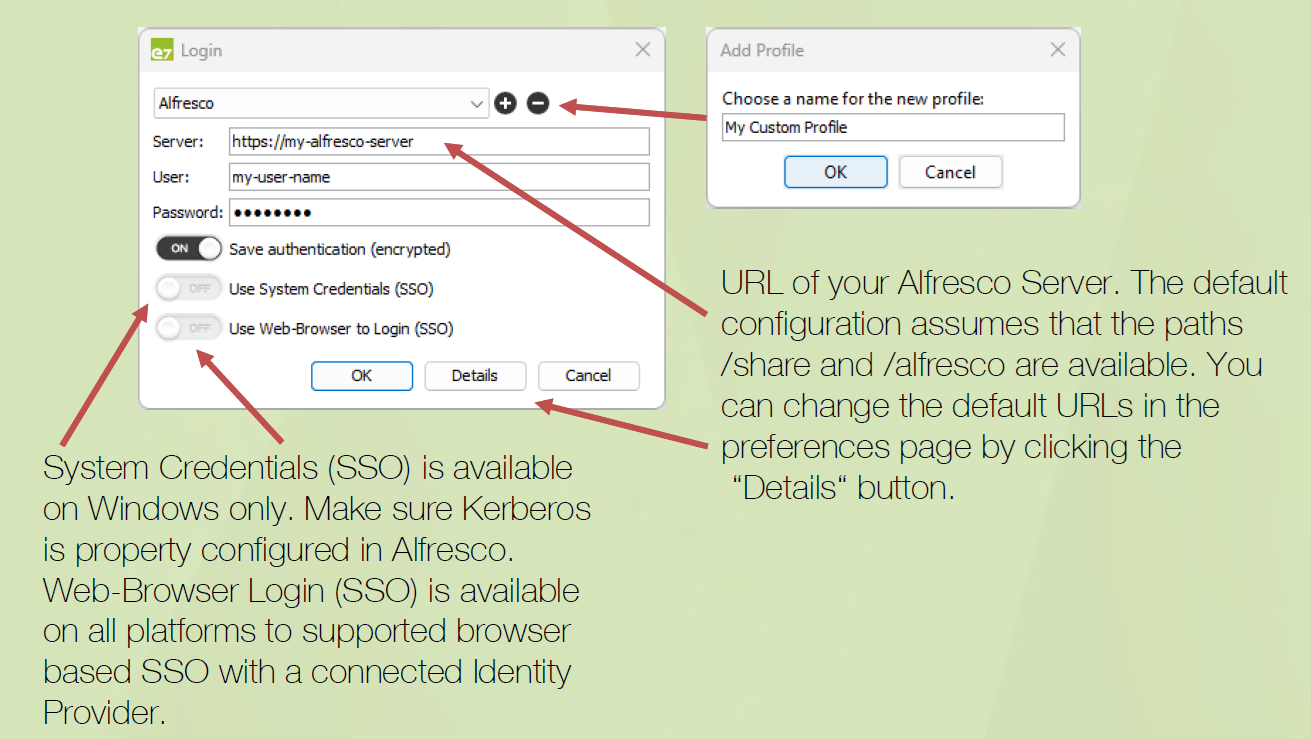
By clicking „Details“ you can enter custom URL values and other settings for Alfresco Share and your Alfresco Repository.
Enable NTLM SSO:
- Activate NTLM in Alfresco: https://docs.alfresco.com/content-services/latest/admin/auth-sync/
- Login with system credentials: Choose „Use system credentials (SSO)“ in ezuno’s login dialog.
Enable Kerberos SSO:
- Activate Kerberos in Alfresco: https://docs.alfresco.com/content-services/latest/admin/auth-sync/
- Activate Kerberos in ezuno: Set the SPN in ezuno’s preferences at Authentication/Negotiate SPN.
- Login with system credentials: Choose „Use system credentials (SSO)“ in ezuno’s login dialog.